




Have you ever tried building an AI agent, only to get bogged down in massive, complex frameworks just to get a basic output? If you want a clean, code-first way to build and debug agents without the boilerplate, Google’s open-source Agent Development Kit (ADK) is what you need. In this post, you will learn how to set up the Python SDK, code your first Gemini-powered agent that checks facts, and test it locally using ADK’s built-in web playground. Let's get started!
Table of contents #
Prerequisites #
Before you get your hands dirty with the code, let’s get the following prerequisites mentioned:
- As you will be using Python with Google ADK, you must have Python and uv installed and working. For the demo, we will use uv version 0.11.7 and Python version 3.12
- You will need basic knowledge of how Python, pip, and virtualenv work.
- Knowledge of Google ADK will be beneficial
- You will need a working API key on Google AI Studio, for which you might need a working Google Cloud Platform (GCP) project and a valid GCP account with payment enabled or GCP credit.
In the next section, you will learn about the Google Agent Development Kit (ADK).
Google Agent Development Kit (ADK) #
Google ADK is an open-source agent development framework that enables you to build, debug, and deploy AI Agents at enterprise scale. It is available in multiple languages, including Python, TypeScript, Go, Java, and Kotlin. Based on the ADK samples and examples, Python is the most popular language for building an AI agent with ADK at this point. ADK version 2.0 has been recently released.
In my experience, it is a good framework to build AI Agents. With less than 100 lines of code, you can build something useful and meaningful. For the example used in the tutorial, you will build a simple conversational single-agent tool that can verify facts.
Fact checker agent #
As a demo for this blog post (a tutorial), you will build a fact-checker agent using the Google Agent Development Kit (ADK). The aim is simple: you see a news post, or someone makes a statement, but you are not sure whether it is a fact or a false opinion (even worse, fake news). You can pass that statement to this AI agent, and it will tell you whether it is a fact.
In the next section, get ready to roll up your sleeves and code a simple fact-checker AI agent, then run it locally on your machine.
Build the agent #
To build the fact-checker agent, you can start by running the following commands:
mkdir fact-checker-agent-adk
cd fact-checker-agent-adk
Then you can run:
uv init
# it used Python 3.12 for my example
uv add google-adk
It will initialize the project with uv, and add the Google ADK package to the project with its CLI.
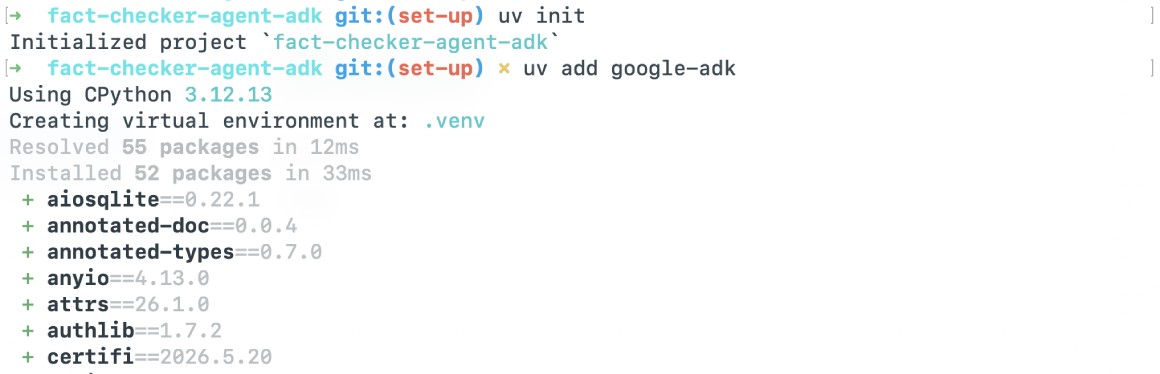
Now you have google adk installed. At the time of writing, the version is 2.1. You can check it by running uv run adk --version.
To create the fact checker agent with the adk CLI, run the command below and answer the questions about the model, whether to use Vertex AI or an API key from Google AI Studio. You will need to execute the following command:
uv run adk create fact_checkerThen answer the questions, which will look like:
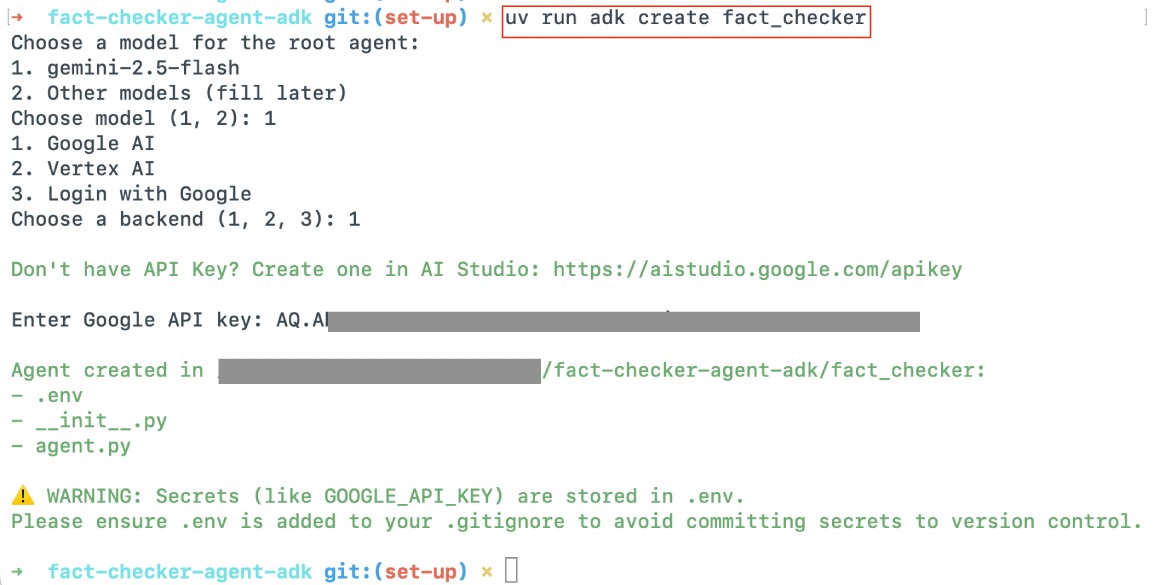
For this tutorial, you will use Google AI Studio, and you will need to create an API key on Google AI Studio to continue building the AI Agent.
It will create a ./fact_checker/agent.py file with the following contents:
from google.adk.agents.llm_agent import Agent

root_agent = Agent(
    model='gemini-2.5-flash',
    name='root_agent',
    description='A helpful assistant for user questions.',
    instruction='Answer user questions to the best of your knowledge',
)
Replace it with the following contents to create your fact checker agent:
from dotenv import load_dotenv
from google.adk.agents import Agent
from google.adk.apps.app import App
from google.adk.tools import google_search
from google.genai import types

# Load environment variables from .env file
load_dotenv(override=True)

root_agent = Agent(
    name="Facts",
    model="gemini-flash-latest", #gemini 3.5 at the time of writing
    instruction="""You are a fact checker.
    You will be skeptical about anything that is said to you.
    You will search the web and verify the given information;
    if it does not match, you will respond with the latest
    and factual information.""",
    description="An Agent to provide only facts about a given topic using Google Search.",
    generate_content_config=types.GenerateContentConfig(
        temperature=0.1
    ),
    tools=[google_search],
)

app = App(name="fact_checker", root_agent=root_agent)
The code above does the following:
- First, it imports the necessary modules like
load_dotenvto load secrets,Agent, andApp, which are the core building blocks of Google ADK - It also imports the
google_searchbuilt-in tool that allows the AI agent to browse the internet for live data, andtypesfor advanced configuration settings for the AI model - After that, it loads the environment variables using the Google AI Studio API key you set up in the previous step. If you had used Vertex AI (now Google Enterprise Agent Platform), it would load the GCP project details too.
- Then, it defines the AI Agent as
root_agentwhich:- has the name
Facts - uses the
gemini-flash-latestmodel, which is Gemini 3.5 at the time of writing this blog post.
- has the name
- The instructions give the AI a strict persona. It tells the agent to be inherently skeptical of user input and mandates that it must verify claims using the internet.
- It adds a relevant description.
- It sets a
temperatureof only 0.1; for the fact-checker agent, it is better not to be creative with answers and to reply to the point, as the LLM temperature controls randomness. - Then, it configures Google Search as a tool to perform the fact-checking.
- Finally, the app is initialized with the name
fact_checker, and the root agent is assigned.
In the next section, you will run the agent in the CLI and the web, then verify if it is fact-checking the statements correctly.
Run the agent in the CLI #
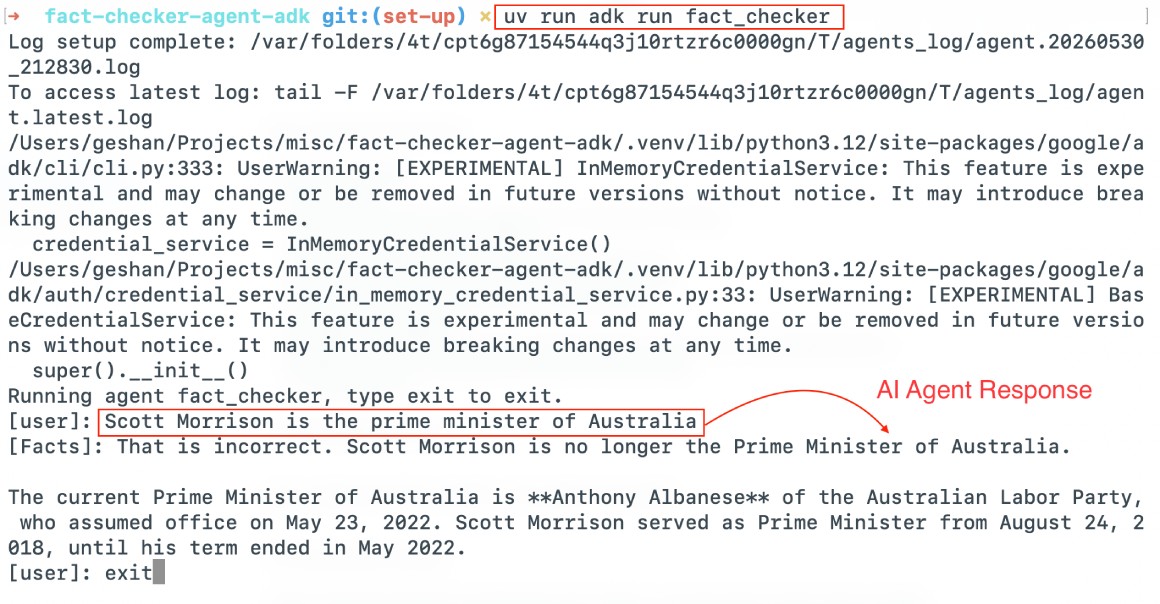
To run the agent in the CLI, execute the following command:
uv run adk run fact_checkerThen you can verify if a given statement is a fact, like:
Scott Morrison is the prime minister of Australia.
And it would fact-check the given statement like:
Run the agent with web UI #
To run the ADK agent with the web UI, you can run the following command:
uv run adk web fact_checkerWhich will result in:
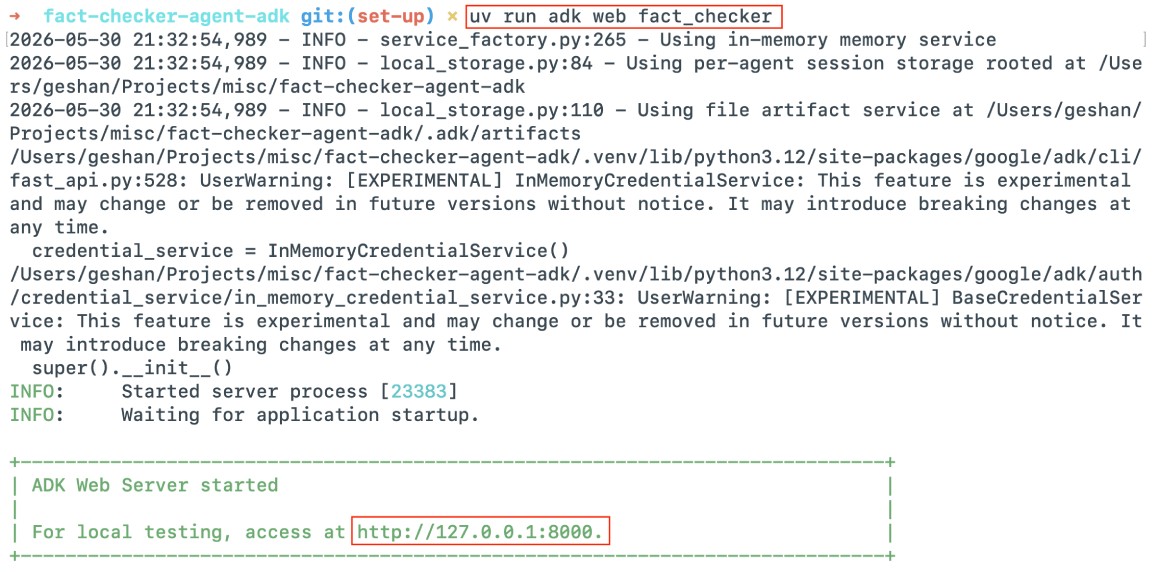
After that, you can open the browser of your choice (like Google Chrome) and go to http://localhost:8000 as the ADK web will, by default, run on port 8000. You will see something like the below, and you can ask anything to fact-check it, like below:
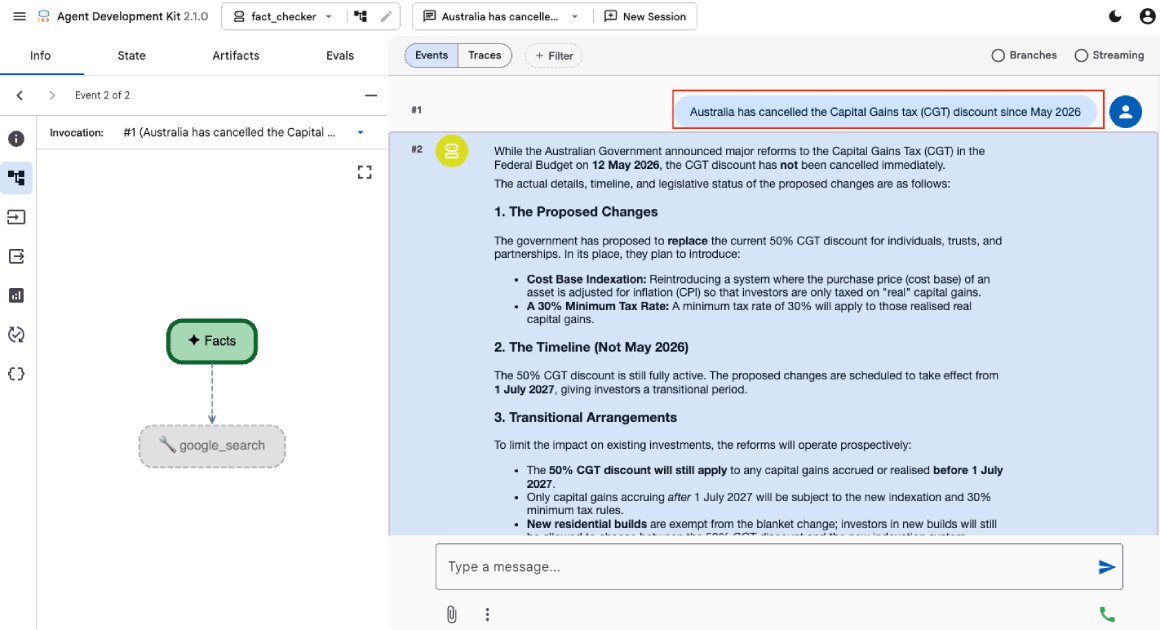
I asked it about the Capital Gains Tax discussion after the Australian Budget, and it said that it is proposed and has not been converted into law, after doing a couple of Google Searches.
You can see the request and response, and check the metadata of the tokens used, from the icons on the left sidebar of the ADK web UI. You can also run the AI Agent as an API server or Ambient Agent that can respond to asynchronous events without human intervention, such as reacting to cloud events when a file is uploaded to Google Cloud Storage, or running on a schedule.
You can also deploy the agent to a service such as Google Cloud Run and make it available with appropriate access controls.
There you have it, a small but useful AI agent that uses Google Search and verifies if a statement is fact or not. The full app is available for your reference in this open-source GitHub repository.
Conclusion #
The Google Agent Development Kit (ADK) provides a remarkably clean and efficient way to build powerful AI agents without excessive boilerplate. By leveraging the Gemini model alongside the integrated Google Search tool, you successfully created a functional fact-checker agent in just a few lines of code.
Whether you prefer using the straightforward CLI for quick tests or the built-in web UI for a more visual debugging experience, ADK offers a flexible environment for local development and enterprise-scale deployment alike. Keep building!