




With AI doing some or most of the code writing (ahm! generation, if I may), being strong in the basics becomes even more crucial. If you have the word "engineer" in your job title, then knowing tools like Git and Docker has become inevitable. In this post, you will learn about the three main Git branching strategies and which one your team should choose for continuous delivery. This post will also cover real-life experiences and recommend a Git branching strategy that has proven more effective for the teams I've been a part of. Let’s get started!
Table of Contents #
- Continuous integration and delivery
- Gitflow
- GitHub Flow
- Trunk-based development
- GitHub flow strikes the right balance
- Conclusion
Continuous integration and delivery #
As stated in Atlassian’s blog post:
Continuous integration (CI) is the practice of automating the integration of code changes from multiple contributors into a single software project. It's a primary DevOps best practice, allowing developers to frequently merge code changes into a central repository where builds and tests then run.
So the focus is on integrating code changes into a single project or for better understanding a Git Branch.
Similarly Continuous delivery as per Jez Humble is:
Continuous Delivery is the ability to get changes of all types—including new features, configuration changes, bug fixes and experiments—into production, or into the hands of users, safely and quickly in a sustainable way.
In other words, Continuous delivery is the practice of ensuring that your software is always in a releasable state. It means that whenever a feature is finished, tested, and approved, it can be deployed to production with the push of a button.
But how do you organize your Git branches to support this seamless flow? If your branching model is too complex, continuous delivery becomes hard because the code gets stuck in a web of merges. If your branching model is too loose, you risk deploying broken code to your users. In the next section, you will learn about one of the older Git branching strategies, Gitflow.
Gitflow #
When discussing version control workflows, it is impossible not to start with Gitflow. Introduced around 2010 by Vincent Dreisen in his blog post of the same name, it was one of the first formalized, moderately adopted branching models that gave teams a structured way to handle releases. For many years, this was considered a good standard for software development teams. It provided a strict, rule-based approach to managing features, releases, and hotfixes.
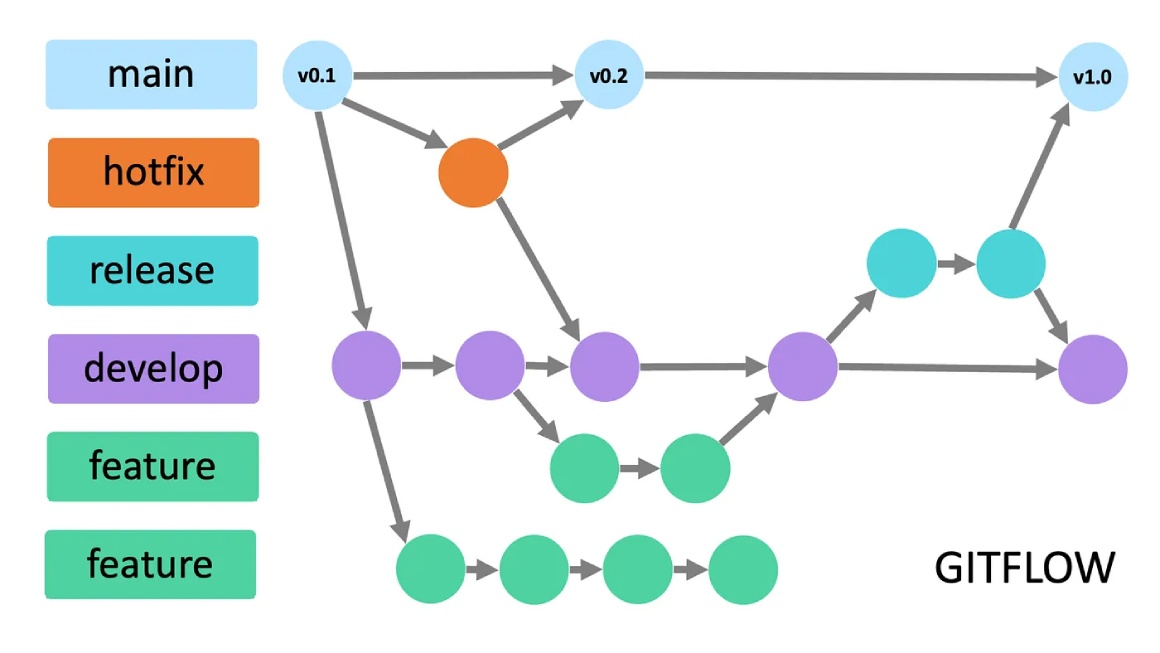
In the Gitflow model, the master branch is reserved exclusively for code currently running in production. You never commit directly to master. Alongside it lives the develop branch, which serves as the integration branch for all new features. When you want to build a new feature, you branch off from develop to create a feature/your-feature-name branch. Once your work is done, you merge it back into develop.
The Image is taken from this blog post.
This sounds fine in theory, but the complexity multiplies when it is time to release. Multiple changes from two or more software engineers would have been merged to develop. Big changes = big risk, and all of it goes to production in one go when the develop branch is deployed. After deployment, the develop branch’s changes have to be merged into master.
If a critical bug is found in production, you have to create a hotfix branch off of master, fix the bug, and then merge that hotfix into both master and develop.
Continuous delivery relies on small, frequent, and automated releases. Gitflow, by its very design, encourages batching features together into large, infrequent releases. The overhead of managing multiple long-lived branches, resolving complex merge conflicts between develop and master, and maintaining release branches creates massive friction.
While Gitflow might still make sense for software with scheduled, versioned releases (like desktop applications or mobile apps that require app store approval), it is generally considered not up to the mark for modern web applications and APIs that aim for multiple deployments per day.
GitHub Flow #
As the frustrations with Gitflow grew, a new, much simpler model emerged and quickly took the software engineering world by storm. This model gained massive popularity on GitHub with the introduction of the Pull Request (PR) mechanism. It is aptly named GitHub Flow or simplified Gitflow.
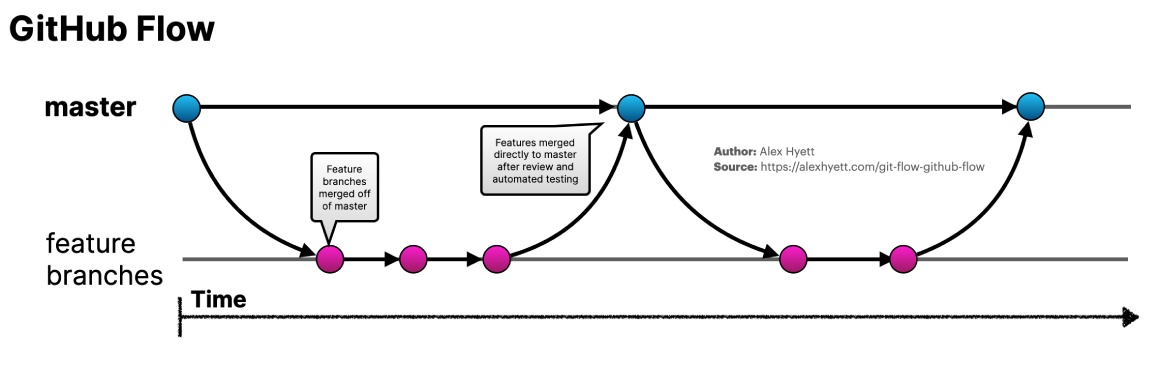
GitHub Flow is beautifully simple. Unlike Gitflow, it operates on the principle that there is only one long-lived branch: master (often referred to as main in modern repositories). The golden rule of GitHub Flow is that the master branch must always be deployable.
When you want to work on a new feature or fix a bug, you create a descriptively named branch directly off of master. You write your code, commit your changes, and push the branch to the remote repository. Then, you open a Pull Request. The Pull Request is the heart of GitHub Flow. It is where code reviews happen, where automated tests are run by your Continuous Integration (CI) server, and where discussions about the architecture and logic take place. Once the code is reviewed and approved, it is merged into master.
The image is taken from this blog post.
Because of its simplicity, GitHub Flow is widely considered an excellent git branching strategy for continuous delivery. However, there are two distinct ways teams handle deployment in this flow, and you must choose the one that aligns with your team's risk appetite.
Deploying before merging #
In this variation of GitHub Flow, the deployment happens before the code is merged into the master branch. When you open a Pull Request, your CI/CD pipeline automatically provisions a temporary environment or deploys the feature branch to a staging server or a preview URL (also known as a deployment preview).
You and your team test the feature branch thoroughly in this environment. Once the CI tests pass, the product manager approves the feature, and the QA checks pass (if any), you deploy that exact feature branch directly to the production environment. Only after the code runs successfully in production and has been verified as stable, do you merge the Pull Request into the master branch. This could be done within minutes of the production deployment or may take some time, depending on the type of change or the feature deployed.
This approach guarantees that the master branch is always 100% stable. If a deployment fails, master is untouched, and you can simply deploy master to roll back. Then, fix the issue on your feature branch and try again. This is a highly resilient way to handle continuous delivery, though it requires sophisticated deployment tooling to deploy from arbitrary branches or tags.
Deploying after merging #
The second, and perhaps more common, variation is deploying after merging to master. In this scenario, once your Pull Request is approved and the automated tests pass, you merge the feature branch into master.
Merging into master triggers your continuous delivery pipeline. The pipeline takes the latest commit on master, builds the application, and deploys it to production. You might choose to automatically create a Git tag for every deployment to keep track of versions.
While this is easier to set up in most CI/CD tools, it comes with a significant caveat: master will not always be stable. If a bug slips through the code review and automated tests, the pipeline will deploy broken code to production. Because the broken code has already been merged into master, the master branch is now broken.
To recover, you must either quickly run the git revert command to undo the merge commit and push the reversion through the pipeline, or roll back the deployment using your infrastructure tools (such as Kubernetes or other traffic-control mechanisms) while you fix the master branch. This requires your team to be highly responsive and have excellent application-level logging and monitoring in place to detect issues immediately.
Rollback would typically involve opening a pull request and merging it to remove the problematic change from master, so other software engineers can merge their work and deploy to production as normal.
Regardless of which deployment variation you choose, GitHub Flow's reliance on a single long-lived branch drastically reduces merge conflicts and cognitive load, making it a useful git branching strategy for continuous delivery.
Trunk-based development #
If GitHub Flow simplifies things by having only one long-lived branch, then Trunk-based development takes the concepts of simplicity and speed to their absolute extremes. In recent years, Trunk-based development has been promoted by DevOps experts and the DORA (DevOps Research and Assessment) reports as the ultimate practice for high-performing engineering teams.
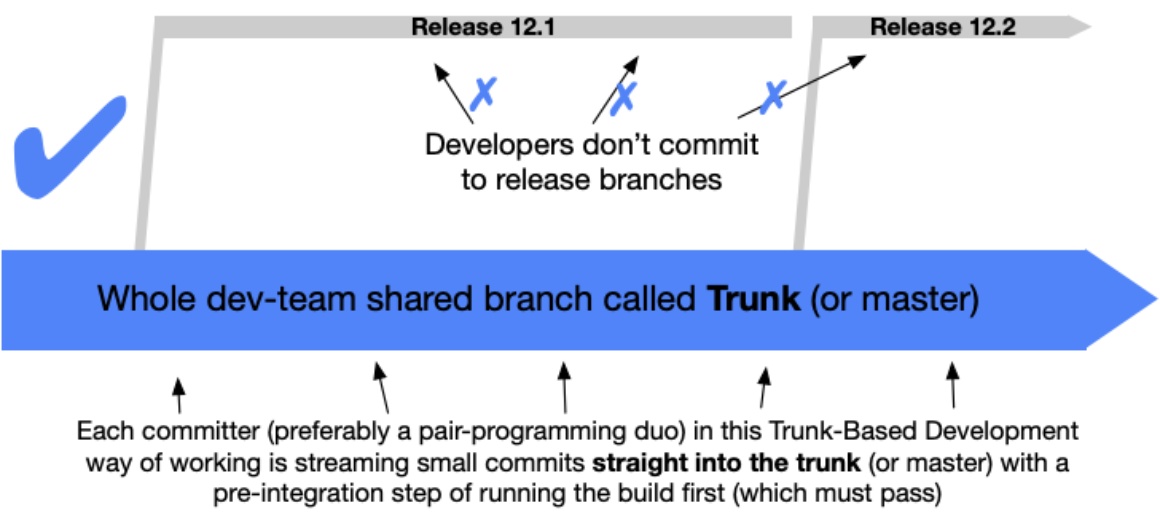
However, there is often a subtle confusion surrounding Trunk-based development. The confusion usually stems from whether it means having literally only one branch (master or "trunk") where everyone commits directly, or doing extremely small, short-lived feature branches that are merged multiple times a day.
The image is taken from Trunk Based Development website.
In practice, modern Trunk-based development usually means the latter. Software engineers create very short-lived branches off the trunk, write a small batch of code, and merge it back into the trunk as quickly as possible—often several times a day. The goal is to completely eliminate the "merge hell" that occurs when long-running feature branches diverge too far from the main codebase. By integrating code continuously, you ensure that everyone is always working on the most up-to-date version of the software. This is where sync code review with pair programming comes into play. In this age of AI written/generated code pair programming might be a dying art form.
When evaluating a git branching strategy for continuous delivery, Trunk-based development is often seen as the holy grail. Because code is integrated so frequently, the continuous delivery pipeline is constantly firing, deploying small, incremental changes to production. This drastically reduces the blast radius of any given deployment. If a deployment breaks something, it is incredibly easy to pinpoint the cause because the changeset is so small.
You cannot simply adopt Trunk-based development by telling your team to merge faster. Because you are constantly merging code into the trunk—even code for features that are only half-finished—using feature flags becomes absolutely essential for Trunk-based development.
Feature flags (or feature toggles) allow you to wrap your new, half-done code in a conditional statement. The code is deployed to production, but the feature flag is turned off, so end users cannot see or interact with the new feature.
For example, if you are building a new checkout flow, you will merge the database migrations on Monday, the backend API routes on Tuesday, and the frontend UI components on Wednesday. All of this code goes to production immediately via your continuous delivery pipeline. However, because the feature flag is disabled, customers continue to use the old checkout flow. Once the entire feature is complete and tested in production by internal staff, you simply flip the switch on your feature flag dashboard, and the new checkout flow is instantly available to your users.
Trunk-based development requires a highly mature engineering culture. You must have an extensive suite of automated tests (unit, integration, and end-to-end) that run within a reasonable time. If your test suite takes an hour to run, you cannot merge multiple times a day. You also need excellent monitoring, fast build times (utilizing tools like Docker multi-stage builds), and a team that deeply understands how to break large tasks into tiny, independent, release-ready parts.
If your team lacks this level of maturity, attempting Trunk-based development will likely result in broken builds, frustrated engineers, and a chaotic production environment.
GitHub flow strikes the right balance #
You have now explored the three main contenders for your team's workflow. Gitflow is heavy and bureaucratic, hindering rapid deployment. Trunk-based development is incredibly fast and efficient, but it requires a level of engineering maturity, testing infrastructure, and feature flag management that many teams simply do not possess yet.
When choosing a Git branching strategy for continuous delivery, you need a process that provides structure without bottlenecks and speed without chaos. This is exactly why GitHub flow strikes the right balance.
You can think of GitHub Flow as existing in the "Goldilocks zone" of version control strategies. It is not too hot or too cold; it is just right.
GitHub Flow provides enough structure to ensure code quality. By utilizing Pull Requests, you enforce a mandatory code review process. This ensures that at least one other software engineer looks at the code, checks for architectural issues, and verifies that the automated tests have passed before anything is merged. This serves as a crucial safety net, preventing bad code from reaching your users.
At the same time, GitHub Flow is lightweight enough to support true continuous delivery. Because there is only one long-lived branch, developers do not have to navigate a maze of develop, release, and hotfix branches. When a feature is ready, it is reviewed, merged, and deployed. The cycle time from writing code to delivering business value is kept short.
For most teams—especially those building web applications, SaaS products, or microservices—GitHub Flow is the best fit.
It allows junior engineers to work safely within feature branches without the fear of breaking the trunk. It allows senior engineers to enforce quality standards through PR reviews. And it allows the operations and DevOps personnel to build straightforward, predictable CI/CD pipelines that trigger deployments based on actions taken on the
masterbranch.
Furthermore, GitHub Flow does not strictly prohibit the use of feature flags. In fact, as your team matures, you can easily incorporate feature flags into your GitHub Flow process. You can start by building smaller feature branches and merging them more quickly, gradually moving your team's culture closer to Trunk-based development without completely overhauling your branching strategy overnight.
By choosing GitHub Flow, you are adopting a pragmatic, battle-tested methodology that aligns perfectly with the goals of agile software development and continuous delivery. It removes the unnecessary overhead of legacy models while providing the safety mechanisms needed to protect your production environment.
Conclusion #
Software engineering is a complex discipline, and delivering reliable software to your customers quickly is one of the hardest challenges a team faces. The tools and processes you choose should empower your developers, not hinder them.
In this guide, you have explored the landscape of version control workflows. You learned that while Gitflow was a pioneer, its multiple long-lived branches make it too cumbersome for modern, rapid release cycles. You discovered that Trunk-based development offers incredible speed and integration, but demands a highly mature testing culture and strict reliance on feature flags.
Ultimately, finding the right git branching strategy for continuous delivery comes down to evaluating your team's current capabilities and your business needs. For the vast majority of software engineering teams, GitHub Flow provides the perfect equilibrium. It leverages the power of Pull Requests for code quality while maintaining a single, deployable master branch to enable fast, frictionless releases.
Remember, your branching strategy is a means to an end. The ultimate goal is to deliver value to your users consistently and safely. Choose the strategy that keeps your team productive, your codebase clean, and your deployments boring and predictable. Happy coding and deploying!