




Docker Compose is a powerful tool that allows you to define and run multi-container Docker applications. It simplifies the process of managing and orchestrating multiple containers, making it a popular choice for development and testing environments. One of the key features of Docker Compose is the depends_on option, which allows you to specify dependencies between services. In this beginner's guide, you will explore how to use depends_on effectively, ensuring your services start up in the correct order and function seamlessly. Let’s get started!

Table of contents #
- Docker compose depends on
- Difference between depends_on and links
- Docker compose depends on under the covers
- Example with depends_on and service_healthy condition
- Conclusion
Docker compose depends on #
Before we dive into depends_on, let's briefly recap Docker and Docker Compose. Docker is a containerization technology that packages and runs applications in isolated environments called containers. Docker Compose builds upon Docker, enabling you to define and manage multiple containers and their configurations in a single YAML file called docker-compose.yml. This declarative approach streamlines the process of running and orchestrating complex applications. You are freed from long docker run commands using this declarative and easy-to-understand syntax that can be comprehended in a single glance.
Now, where does depends_on fit into this picture? When working with multi-container applications, it's often crucial to ensure that services start up in a specific order or that the dependent service starts and is ready before the main service.
For example, if your application depends on a database, the database service needs to be running before your application service starts. This is where depends_on comes in. It allows you to specify which services a particular service depends on, ensuring that the dependent services are started before the service that relies on them.
Difference between depends_on and links #
It's important to distinguish depends_on from links. While links create network aliases and allow containers to communicate with each other by their service names, depends_on solely focuses on startup order. It does not automatically guarantee that the dependent service is ready to accept connections or requests. You will explore how to handle readiness checks later in this guide.
Let’s look at an example for an application that is a Node.js API (for Quotes) that uses Docker and has a Postgres database to store the data. The full Node.js Postgres tutorial is available if you want to learn and understand how it is built. A working docker compose file with both the Node.js API and Postgres database services using links to make it possible for the Node.js container to talk to the db can look like the below:
version: '3.8'
services:
  db:
    image: postgres:14.1-alpine
    restart: always
    environment:
      - POSTGRES_USER=postgres
      - POSTGRES_PASSWORD=postgres
    ports:
      - '5432:5432'
    volumes:
      - db:/var/lib/postgresql/data
      - ./db/init.sql:/docker-entrypoint-initdb.d/create_tables.sql
  api:
    container_name: quotes-api
    build:
      context: ./
      target: production
    image: quotes-api
    restart: always
    links:
      - db
    ports:
      - 3000:3000
    environment:
      NODE_ENV: production
      DB_HOST: db
      DB_PORT: 5432
      DB_USER: postgres
      DB_PASSWORD: postgres
      DB_NAME: postgres
    volumes:
      - ./:/src
      - /src/node_modules
volumes:
  db:
    driver: local
You can understand more about a similar docker compose file for Docker and Postgres. The above example is defined using docker compose file version 3.8. You have defined two services in this docker-compose.yml file. The first is the db and the second is the api. You can see the Dockerfile used for the api as well. The db service uses the official Postgres version 14.1 with the alpine flavor as it is a small image and ultimately a smaller container. It uses some environment variables and volumes; you can read more about it in Postgres with docker compose.
Next, the API container is defined, which uses a local Dockerfile built with the production context. It also has the necessary environment variables defined and runs on port 3000. It also has volumes so that the data is persisted across container restarts. The main part here is links (highlighted in yellow in the above code snippet), which indicates that the API links to the db and can communicate with it.
If you start both services with docker compose up, it will show a log like the one below:
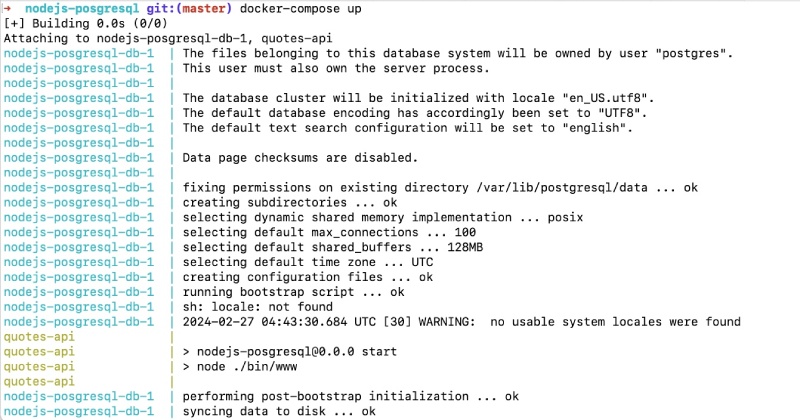
Notice that the API started before the DB fully started; this is similar to what happens when depends_on is used without a condition.
In the next section, you will learn about depends_on and the service_healthy condition.
Docker compose depends on under the covers #
Docker Compose depends_on only specifies the order in which the services should start when no conditions are used. While depends_on ensures that services start in the correct order, it's important to understand that it does not guarantee that the dependent service is ready to accept connections or requests.
To address this, you can use additional tools or techniques to check the readiness of the dependent service. One common approach is to use a health check script or tool that verifies the service's availability before proceeding. For example, you could use a script that checks if the PostgreSQL database is listening on port 5432 before starting your Node.js application. Wait-for-it is a tool you can use, but it is not the native Docker Compose way of waiting for the dependent service to be ready.
So, what is the native Docker Compose depends_on way to do it? You will learn about that next.
Services startup condition with service_healthy #
Docker Compose added new conditions called service_started and service_healthy. The service_healthy condition allows you to specify that a service should only start after another service has successfully started with a health check. This provides a more fine-grained level of control in conjunction with depends_on.
With service_healthy, you can specify a condition that checks the health of the dependent service. For example, you can specify that a service should only start after the dependent service has started and is listening on a specific port. This ensures that the dependent service is ready to accept connections before the service that depends on it starts.
You can use just depends_on with Docker Compose, but it will only ensure that the dependent services start before the one that depends on them. To make sure that the dependent service has started and is ready/healthy to accept requests/connections, use depends_on with a health check on the dependent service. You can find an example of this in the next section.
Example with depends_on and service_healthy condition #
Let's consider a practical example to illustrate how to use depends_on with the service_healthy condition. You will use the same Node.js API that connects to a PostgreSQL database to fetch quotes. You want to ensure that the PostgreSQL database starts and can accept connections before your Node.js application starts.
Here's how you can achieve this with a docker-compose.yml file:
version: '3.8'
services:
  db:
    image: postgres:14.1-alpine
    restart: always
    healthcheck:
      test: ["CMD-SHELL", "pg_isready -U postgres"]
      interval: 5s
      timeout: 5s
      retries: 5
    environment:
      - POSTGRES_USER=postgres
      - POSTGRES_PASSWORD=postgres
    ports:
      - '5432:5432'
    volumes:
      - db:/var/lib/postgresql/data
      - ./db/init.sql:/docker-entrypoint-initdb.d/create_tables.sql
  api:
    container_name: quotes-api
    build:
      context: ./
      target: production
    image: quotes-api
    restart: always
    depends_on:
      db:
        condition: service_healthy
    ports:
      - 3000:3000
    environment:
      NODE_ENV: production
      DB_HOST: db
      DB_PORT: 5432
      DB_USER: postgres
      DB_PASSWORD: postgres
      DB_NAME: postgres
    volumes:
      - ./:/src
      - /src/node_modules
volumes:
  db:
    driver: local
In this example, similar to the one above, you have two services: db and api. The db service uses the official PostgreSQL 14.1 Alpine image and exposes port 5432. It also defines environment variables for the database user, password, and database name. The api service represents your Node.js application, which depends on the db service. This dependency is specified using the depends_on option.
The Node.js app specifies that it depends on the db service. The additional condition on the depends_on option you have specified is that the dependent service must be healthy (service_healthy). This has been highlighted in the above code. This ensures that the api service starts only after the db service is healthy (ready to receive connections).
On the db service, a healthcheck is defined that uses the pg_isready tool. There are several options for the health check; the first is the test itself. To check if the DB is healthy, you use the pg_isready tool, which checks the connection status of a PostgreSQL server. The exit status of this command determines the health status.
There are other options for the health check, such as interval, timeout, and retries. For this example, you specify a maximum of 5 retries at 5-second intervals with a timeout of 5 seconds. All of this is highlighted in the above code snippet.
There is also the service_completed_successfully option. This option specifies that a dependency is expected to run to successful completion before starting a dependent service. It is another option you can use if it fits your needs. For this example, you will use the service_healthy option as specified in the above docker-compose file.
When you run docker compose up, Docker Compose will start the db service first, followed by the api service. This ensures that the PostgreSQL database runs before your Node.js application attempts to connect to it.
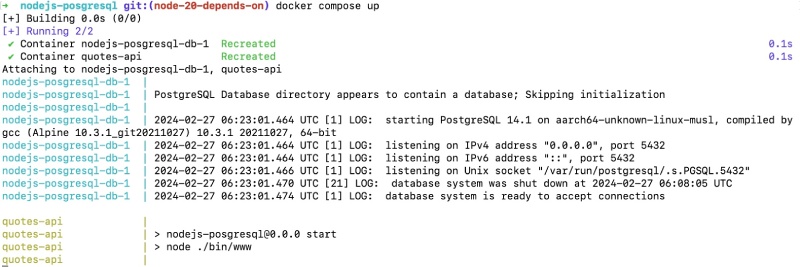
As seen above, the Node.js API this time only started after the Postgres database had started and was deemed healthy by the pg_isready tool that tried to connect using the postgres user. So once you see this log, you can go to http://localhost/quotes and you will see the output from the database. This takes us to the end of this beginner's guide.
Conclusion #
The depends_on option in Docker Compose is a valuable tool for ensuring that services start up in the correct order with dependencies in a healthy state. By specifying dependencies between services, you can avoid errors and ensure your application functions seamlessly.
However, it's important to remember that
depends_ononly controls the startup order and does not guarantee service readiness by default. Use additional tools or techniques, such as health checks, to verify the availability of dependent services before starting services that rely on them.
By understanding and effectively using depends_on, you can streamline the development and deployment of your multi-container applications, ensuring they run smoothly and reliably. I hope you learned the proper way to use Docker Compose depends_on. Keep containerizing and using Docker Compose effectively!